 AIGCLIST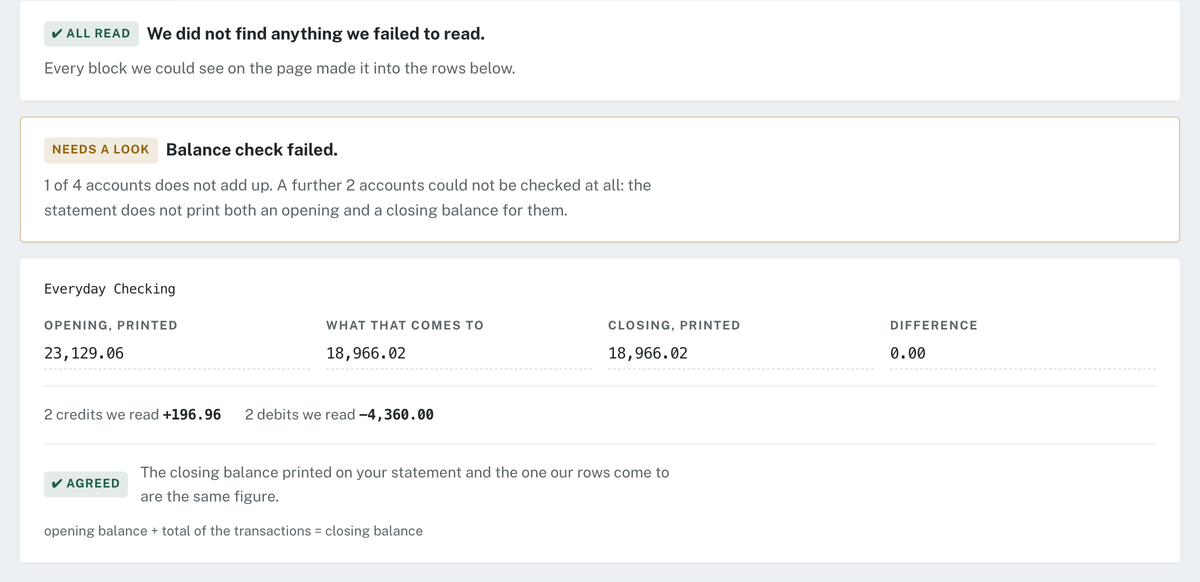
GetBankCSV
GetBankCSV converts PDF bank statements to CSV, XLSX, QBO, OFX, or QIF, balance-checks every row, and shapes exports for QuickBooks and Xero.
Decision summary
Overview
What is GetBankCSV?
GetBankCSV is a bank statement converter that turns PDF bank statements into CSV, XLSX, QBO, OFX, and QIF files. It is positioned around two issues: the source file type and the output format. A PDF from online banking has a text layer, while a scan or photo must be read with OCR, which the page describes as less reliable. More importantly, accounting software does not accept just any spreadsheet. GetBankCSV shapes exports to the column layouts, date styles, and row limits documented by QuickBooks Online and Xero, and it balance-checks every file by adding the opening balance to the transactions it reads and comparing that total to the closing balance printed on the statement.
How GetBankCSV works
The process is upload, read, reconcile, and export. A user uploads a PDF, scan, or photo. The page states PDF only, up to 25 MB and 40 pages each, up to 12 files at once. A free account converts one statement per month, up to 10 pages per statement. Password-protected PDFs are supported; the password is used only to open the file and is never stored.
For reading, digital PDFs use their text layer; scans and photos use OCR. The reconcile step adds every transaction row, not a sample, and compares opening balance plus read transactions against the statement's printed closing balance. Anything unread is named by page on screen and inside every output file. The page notes that a balance check cannot see a block that never made it into the table, so it looks for those a second way.
Export offers CSV, XLSX, QBO, OFX, or QIF. GetBankCSV follows accounting software import rules: QuickBooks Online takes a CSV of exactly three columns (Date, Description, Amount) or four (Date, Description, Credit, Debit), capped at 350 KB and 1,000 lines per upload; Xero requires Date and Amount at minimum, income positive and expenses negative, and refuses files over 100,000 rows.
Main features
- Five export formats: CSV, XLSX, QBO, OFX, QIF.
- Row-by-row balance check on every file, not sampled.
- Unread-content notice by page, on screen and inside output files.
- Exports shaped to QuickBooks Online and Xero import rules.
- Digital and scanned PDF support.
- Password-protected PDF handling without storing the password.
- Free tier: one statement per month, up to 10 pages, all five formats, full balance check.
- Files deleted after conversion; nothing kept longer than 24 hours.
- Google sign-in for email only; no credit card for free tier.
Pricing
The free tier includes one statement per month, up to 10 pages per statement, all five formats, the balance check, and unread-content notice. No credit card is required and nothing renews. The page links to "See what it costs" but does not state paid plan prices or limits. Paid pricing is therefore unknown from the supplied page. The upload interface mentions files up to 40 pages and up to 12 at once, while the free tier is capped at 10 pages per statement.
Common use cases
- Accountants and bookkeepers preparing client statements for QuickBooks Online or Xero.
- Small business owners organizing transactions for bookkeeping or tax.
- Users who need sortable, totalable transactions instead of a PDF.
- Converting scanned or photographed paper statements.
- Working with password-protected bank statement PDFs.
- Batch conversion up to 12 files, subject to the free tier's one-statement monthly limit.
Limitations
- PDF only; no other input formats are stated.
- Limits: 25 MB and 40 pages each, 12 files at once; free tier 10 pages per statement.
- OCR for scans and photos is less reliable than a digital text layer.
- A balance check cannot detect a block that never entered the table; the service looks a second way and provides an unread-content notice, but perfect detection is not claimed.
- Free tier is one statement per month, up to 10 pages.
- Paid pricing is not stated.
- No accuracy rate, supported bank list, language support, or API is stated.
- Accounting software limits still apply: QuickBooks Online 350 KB/1,000 lines; Xero 100,000 rows.
- Files are deleted after conversion and nothing is kept longer than 24 hours.
Summary
GetBankCSV converts PDF bank statements into CSV, XLSX, QBO, OFX, or QIF and checks every transaction row against the closing balance printed on the statement. It shapes exports for QuickBooks Online and Xero import rules and offers a free tier of one statement per month, up to 10 pages, with the full balance check. Limitations include PDF-only input, OCR reliability for scans and photos, a monthly free cap, and no paid pricing on the supplied page.
Reviews (0)
No reviews yet. Be the first to rate this product!
Score anatomy
The dimensions behind the editorial score, each with its judgment note. AI Readiness and GEO Score are platform assessments generated by AIGCLIST after submission.
Evidence check
Public claims about this tool, each tagged with a verification status and its cited source.
Decision desk
The questions most worth resolving before you rely on the product or visit its official site.
Continue exploring
More in AI Document Extraction
Published tools that share this product's primary category. They are discovery links, not editorial comparisons.


