 AIGCLIST
PaintsUndo
PaintsUndo generates drawing-process timelapses from a single image.
Benchmarks
How PaintsUndo scores on agent readiness and AI visibility AI Readiness and GEO Score are platform assessments generated by AIGCLIST after submission.
Decision summary
Overview
Play the PaintsUndo demo video. An anime-style illustration fills the frame: every shadow placed, every highlight polished. Then the playback reverses. Colors lift off the canvas. Lines retract one by one. The character dissolves into rough geometric shapes, then a blank white field. It reads like a real artist timelapse run backwards. But no human hand touched any of these strokes. The AI fabricated the entire drawing process from a single finished image.
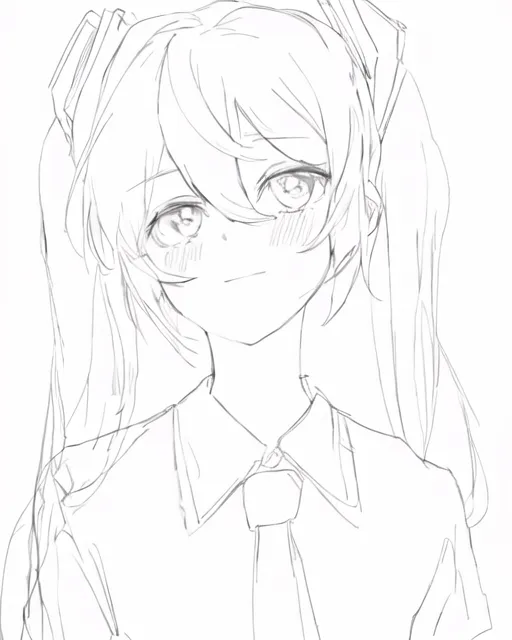
Paints-UNDO is a research project that does one thing: given any image, it generates a plausible sequence of brush strokes, layer adjustments, and revisions that could have produced it. The output is a video, typically 25 seconds at 4 frames per second, that looks like a screen recording of someone drawing in Photoshop or Clip Studio Paint. The illusion is the point. The model is not recovering a real recording; it is inventing one that passes visual inspection.
How Paints-UNDO Works
The name comes from the undo command, Ctrl+Z in most software. The model steps backward through 1,000 hypothetical operations, from finished artwork to blank canvas. Each operation step, numbered 0 to 999, corresponds to a position in the imagined drawing process: 0 is the final image, 999 is the first brush stroke.
Under the hood, Paints-UNDO chains two models together. First, a single-frame model takes the input image and an operation step number, then outputs what the artwork should look like at that stage. Run this 5 to 7 times at different step positions, and you get keyframes: snapshots of the drawing at the sketch phase, the lineart phase, the flat-color phase, and so on. Then a multi-frame model fills in the gaps, interpolating 16 frames between each pair of keyframes. String them together, and you have a video of 100 to 500 frames.
The single-frame model is a modified Stable Diffusion 1.5 with an altered noise scheduler. The betas end at 0.020 instead of the original 0.012, and the final CLIP layer is permanently removed, functionally equivalent to CLIP Skip 2. The operation step is injected via extra embeddings, similar to SDXL approach. Critically, it uses WD14 tagger for prompt extraction rather than human-written prompts. According to the project README, using anything else produces defective results.
The multi-frame model inherits its initial weights from VideoCrafter but was substantially retrained with a modified 3D-UNet that supports temporal attention windows across frames. Its VAE comes from ToonCrafter, an anime-focused temporal VAE. This lineage partly explains why results are strongest on illustration-style inputs.
Who Built It
Paints-UNDO was created by Lvmin Zhang, GitHub handle lllyasviel, a PhD student at Stanford University. Zhang is among the most influential figures in open-source AI image generation. He previously built ControlNet, the neural network structure that lets users steer Stable Diffusion with edge maps, pose skeletons, and depth maps, a project that passed 29,000 GitHub stars. He also created Fooocus, a streamlined Stable Diffusion interface, and Omost, an LLM-driven image composition tool.
Paints-UNDO was released on July 7, 2024, and has since accumulated over 4,000 GitHub stars and nearly 400 forks. In August 2025, Zhang previewed a follow-up called PaintsAlter, a framework that extends the concept to both undo and redo, letting users explore multiple branching drawing processes from the same input.
The official README includes an unusual warning: This GitHub repo is the only official page of PaintsUndo. We do not have any other websites. Do note that many fake websites of PaintsUndo are on Google. The site paintsundo.com, for example, is a third-party Gradio wrapper by a HuggingFace community member, not affiliated with the project.
The Reality Check
Paints-UNDO generates plausible drawing processes, not real ones. Every demo on the project page uses AI-generated input images, images that have no actual drawing history. The model is guessing, and the guess looks convincing because digital art workflows follow predictable patterns.
This cuts both ways. On one hand, the technical achievement is real: the model captures behaviors like layer-flipping, color-curve adjustments, and mid-process idea changes. These are details amateur viewers would miss but that signal authenticity to working artists. On the other hand, as BoingBoing Rob Beschizza noted, the tool demonstrates how easily a fabricated timelapse can pass for a real one, undermining a form of evidence artists have used to prove their work is hand-drawn.
The project page itself is candid about limitations. Failure cases show outputs where the drawing sequence collapses into incoherent blobs, where the model loses track of the subject mid-process, or where the undo trajectory bears no visible relationship to how a human would approach the composition.
How to Run It
Paints-UNDO runs locally via a Gradio web interface. The requirements are steep: inference was tested on Nvidia 4090 and 3090TI with 24GB VRAM. It may work on 16GB, but does not work on 8GB. Zhang estimates the theoretical minimum at 10 to 12.5 GB with extreme optimization, including weight offloading and sliced attention.
Processing one image takes 5 to 10 minutes. The output is a 25-second video at 4 FPS, with a resolution of 320 by 512 or its transpose. If you do not have a GPU that meets the spec, there is no official cloud-hosted option, though a community HuggingFace Space exists. Expect queue times and possible resource limits.
Setup follows a standard conda workflow: clone the repo, create a Python 3.10 environment, install xformers and dependencies, then launch gradio_app.py.
Paints-UNDO is free and open-source. There is no paid tier, no SaaS subscription, and no API. The cost is purely your own compute. For users interested in a different approach to image manipulation, tools like Image to Line take images in the opposite direction, converting finished artwork into clean line drawings. If you need cloud-based video generation without the hardware burden, Kling 3.0 and Wan 2.7 offer hosted alternatives, though neither replicates Paints-UNDO specific undo-timelapse capability.
FAQ
What does Paints-UNDO do?
It takes a single image and generates a video showing a simulated drawing process, as if an artist drew it from scratch, with sketching, inking, coloring, and revisions along the way.
Is Paints-UNDO free?
Yes. It is fully open-source under the GitHub repository lllyasviel/Paints-UNDO. There is no paid version or commercial service.
What hardware do I need to run Paints-UNDO?
An Nvidia GPU with at least 16GB VRAM is recommended (tested on RTX 4090 and 3090TI). See the hardware requirements section above for detailed specs.
Does Paints-UNDO recover the real drawing process?
No. It generates a plausible simulated process. All input images on the official demo page are AI-generated; they never had a real drawing history to recover.
Who created Paints-UNDO?
Lvmin Zhang (lllyasviel), a Stanford PhD student. See the Who Built It section for full background.
Is paintsundo.com the official site?
No. The GitHub repository is the sole official source. The project README explicitly warns about unauthorized third-party websites using the PaintsUndo name.
Reviews (0)
No reviews yet. Be the first to rate this product!
Agent Readiness
How well an agent can understand this product and reconstruct a documented workflow from its official information.
Evidence check
Public claims about this tool, each tagged with a verification status and its cited source.
Decision desk
The questions most worth resolving before you rely on the product or visit its official site.
Continue exploring
More in Image to Image
Published tools that share this product's primary category. They are discovery links, not editorial comparisons.

The img2img AI Tool is a cloud-based collaborative img2img platform for business teams in e-commerce, branding, and B2B marketing. It combines curated prompt libraries, industry templates, in-place text editing, multi-language output, batch export, and visual consistency preservation into a team-oriented workflow. All feature claims are vendor-sourced from the official homepage; no independent third-party validation is currently available.

Couple AI is a web-based artificial intelligence tool that transforms two uploaded selfies into a shared couple portrait. Users can customize the pose, setting, and outfit in the generated image. The service claims professional-quality, natural-looking results in under two minutes with no technical skills required. Input photos should feature clean lighting and clearly visible faces for optimal output.
